

Advertising Log Integration
To achieve effective ad modeling and metric tracking, Advertising Log Integration is essential. This integration can be performed through two methods: web-based and API-based. Each method allows the collection and analysis of logs for ad requests, impressions, clicks, and conversions. Below, we explain each approach.Method Using Web SDK
For web-based retail media, you can automatically handle ad requests and log integration (impressions and clicks) by following these steps:- Log in to Admin and navigate to the Placement menu.
- Select the desired placement from the Placement List and click on Get Placement Tag.
- Copy the footer tag provided on the page (see screenshot below) and paste it at the bottom of your web app’s HTML source.
- Insert the provided
<div id="a2plct1"></div>code where you want the ad to appear. You can modify thea2plct1part as needed.
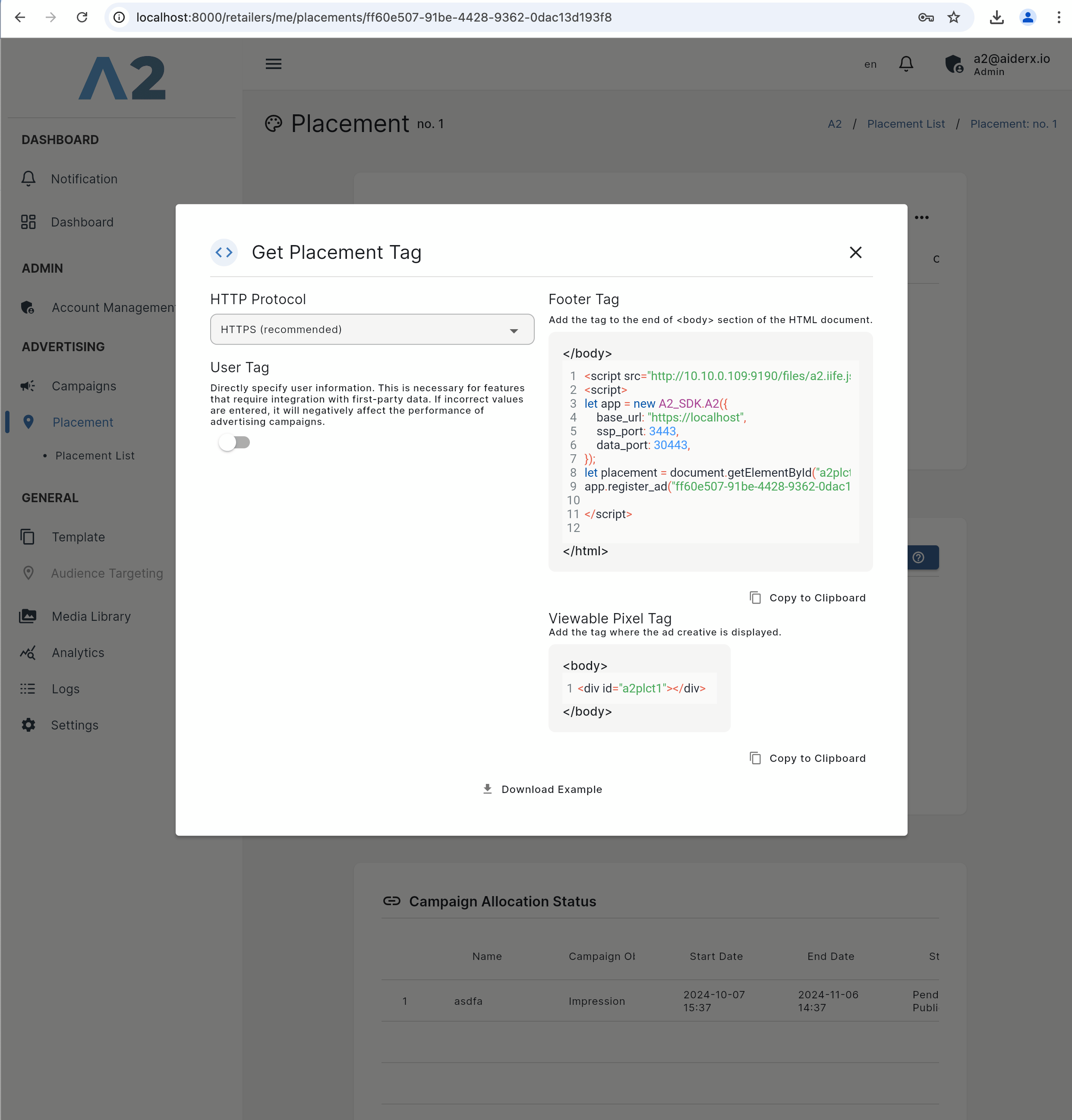 Once set up, the logs for ad impressions and clicks will be automatically integrated. The conditions for each log transmission are as follows:
- Ad Request Log: The ad request log is recorded when the ad is ready to be displayed to the user, meaning the likelihood of the ad appearing on the screen has increased. Specifically, this log is sent when the user’s view approaches within about four times the height of the ad, just before the ad appears on the screen.
- Impression Log (vimp): The impression log is recorded when the ad actually appears on the user’s screen and becomes visible. More specifically, it’s logged when at least 50% of the ad is visible on the screen for over one second. Compared to the ad request log, which logs when the ad is likely to appear, the impression log records when the ad is actually visible on the screen.
- Click Log: The click log is sent when the ad is clicked by the user. This captures the exact moment when the user interacts with the ad, allowing for the analysis of ad engagement performance.
Method Using API
The API-based advertising log integration method allows direct logging of various actions, such as ad impressions, conversions, and clicks. The A2 system tracks logs based on theext.ad_log field in the Edge response data, and impression logs can also be integrated for in-depth ad performance analysis.
- Click Logs
- Data sent when a user clicks an ad.
- Example
- Conversion Logs
- Logs sent when a user completes a desired activity (conversion) after viewing an ad.
- Conversions can include, but are not limited to, the following activities:
- Product purchase
- Adding to cart
- App installation
- Service subscription
- Download
- Link click
- Content consumption for a certain period
- Example:
- (Optional) Impression Logs
- Impression logs are not mandatory in A2, but are recommended for accurate metric measurement.
- Impression logs are sent when an ad is actually displayed to a user.
- It is recommended to measure whether an ad is displayed based on whether more than 50% of the ad is visible on the user’s screen for at least one second.
- If the above criteria cannot be met due to system constraints or other reasons, it is recommended to measure impressions using at least the same criteria.
- Example:
I hope this guide helps with advertising log integration. If you have any further questions or need additional support, please feel free to contact us. Thank you.